 freegame.com.es

Popular Games
Last Played


?mpostor Beans
9 plays












































?mpostor Beans
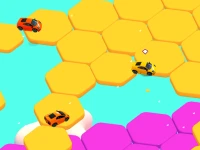
Impostor Beans is a fun and chaotic multiplayer game that mixes fast racing with tricky memory stages. The goofy graphics and surprising layers keep players guessing as they race. You can enjoy it with friends or solo, and the silly physics adds to the unpredictable fun. It is a fresh take on the racing genre that challenges both speed and focus.
How To Play ?mpostor Beans
Pick your character and jump into a race to pass opponents. The second stage requires you to memorize the track layout to clean it. This blend of speed and memory makes every round exciting and different. The goal is to outlast others while keeping track of obstacles.
Controls and Features
Use arrow keys or WASD to steer and the spacebar to jump. Clicking might trigger special moves as you navigate obstacles. The physics feel a bit off and the controls can be clunky, which adds to the challenge. This makes Multiplayer Games feel unique and unpredictable.
Tips
Practice the controls slowly to get a feel for the movement. Focus on passing opponents early and stay alert during the memory stage. Try not to get lost by remembering the key obstacles and track paths.
FAQ
What are the controls in Impostor Beans?
Use arrow keys or WASD to steer, spacebar to jump, and maybe click for special moves. The controls are simple but can feel clunky.
What is the main objective?
Pass your opponents in the race and survive the memory stage by recalling the track layout. The game mixes speed and focus.
Can I play Impostor Beans alone?
Yes, it supports 1 Player mode. You can enjoy the chaotic racing and memory challenges on your own.
What makes the game challenging?
The quirky physics and memory stages create a tough but fun challenge. You must balance speed with careful observation.
About this game
- Supported devices
- Desktop
- Genre
- Multiplayer Games
- Release date
- 24 October 2024
- Latest update
- 24 October 2024
- Rating
- No ratings yet