 freegame.com.es

Popular Games
Last Played


Flap Mania: Tap to Survive
0 plays










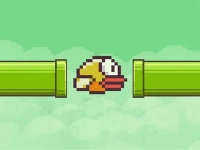































Flap Mania: Tap to Survive
Get ready to take to the skies in Flap Mania: Tap to Survive, a fun and challenging game that will keep you on the edge of your seat!
How To Play Flap Mania: Tap to Survive
Simply tap the screen to keep your bird flapping its wings and soaring through the air. Avoid those pesky pipes and stay alive for as long as you can. And if you think you've got what it takes, try the Wall Bounce mode where the bird bounces between the walls and gets faster every time!
Arcade Games and Action-packed Fun
Flap Mania: Tap to Survive is your typical Arcade game, with a simple yet addictive gameplay that will keep you hooked. With its simple settings like sound, vibration, and revive, you can play without any distractions.
Tips
Here are a few tips to help you survive longer: keep an eye on the pipes, tap the screen at the right time to avoid them, and don't get too comfortable - the game gets faster every time!
FAQ
How do I unlock new birds?
Unlock 20 different birds by collecting coins and completing levels. Each bird has its unique abilities and characteristics, so be sure to explore and find the one that suits you best.
What is Wall Bounce mode?
Wall Bounce mode is a special game mode where the bird bounces between the walls and gets faster every time. This mode adds an extra layer of challenge and excitement to the game.
Can I play with sound and vibration on?
Yes, you can play with sound and vibration on. The game has simple settings like sound, vibration, and revive, so you can customize the game to your liking.
How do I revive my bird?
Don't worry if your bird dies - you can revive it with the simple revive setting. This way, you can keep playing without any interruptions.
About this game
- Supported devices
- Desktop
- Genre
- Arcade Games
- Release date
- 28 March 2026
- Latest update
- 28 March 2026
- Rating
- No ratings yet